 MizpahGuard
Protect your whole home online — without an app on every phone.
Whole-home parental controls: one change on your router covers every phone, tablet, TV, and game console in your house. Real security threats are flagged clearly. Everything else is a fact for you to decide on.
30 days free · No card required · Cancel anytime
See it in action
Why parents choose MizpahGuard
Covers the whole house, no apps
One router setting protects every device on your Wi-Fi. Nothing to install, nothing for a teenager to find and remove.
Goes where your kids go
Add a profile to an iPhone, iPad, or Mac and it stays filtered on any Wi-Fi and on mobile data, for as long as it’s installed.
Real threats flagged, the rest is your call
Only verified security threats are called Dangerous. Everything else is a plain fact, and you decide.
A weekly summary, not a log
We filter out background noise and send a short summary of what’s new and what needs your attention.
Knows what a site really is
We check what a site actually is and double-check every call. If two checks disagree, we say so.
Built for today’s worries
A maintained list of AI “companion” apps and individually verified nudify and deepfake tools that you can block, plus a link to NCMEC’s free Take It Down service.
How it works
- 1
Create your account
Free for 30 days, no card needed.
- 2
Point your router at MizpahGuard
One setting, with step-by-step help. Can't change it? Set up devices one by one instead.
- 3
You’re covered
A router setup covers everything on your Wi-Fi. A device profile covers that device.
Will it work with my internet provider?
Has a DNS setting you can change
- Verizon Fios
- eero
- Spectrum (varies by router)
- Netgear, ASUS, TP-Link, Orbi, Linksys, Google Nest
Locked gateway: use your own router, or set up devices one at a time
Your family’s privacy comes first. We only see which sites are looked up, never the pages you visit or the messages you send. We don’t sell your data or use it for ads, and you control how long logs are kept. Privacy Policy
What you can control
YouTube Restricted Mode and Safe Search
Turn both on for the whole network.
Schedules
Block a category, like gaming or social media, during the hours you choose.
Pause or bedtime, per device
Pause one device, or set nightly bedtimes with an Allow tonight button. For devices with a profile.
Kids can ask, you decide
Your kid requests access from the block page; you approve or deny from your dashboard.
See what it’s for
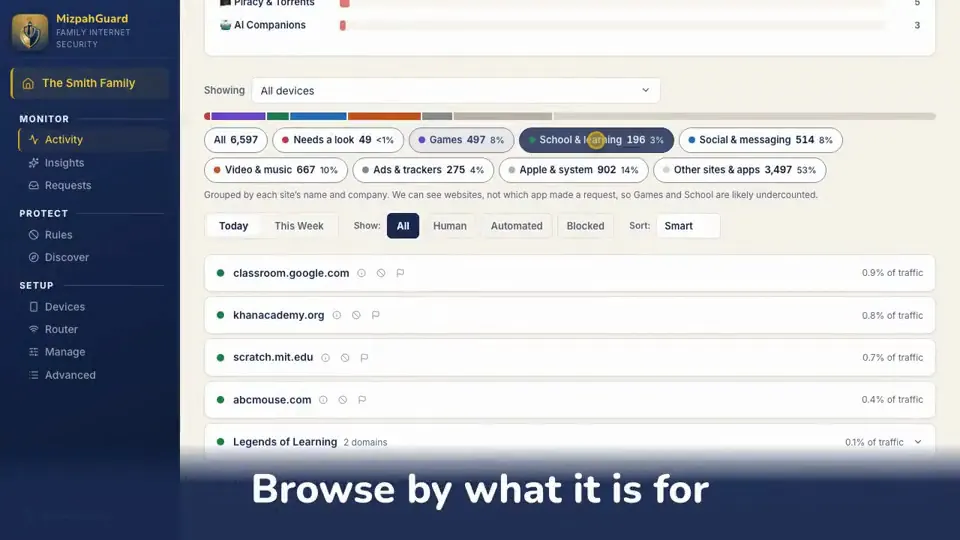
Browse activity by purpose, like games, school, or social, and review sensitive sites one by one.
Ask in plain English
“Why is this blocked?” Get a specific answer, not a raw log.
How MizpahGuard compares
Most tools are either app-based or bare DNS filters, and each has a real tradeoff.
| Feature | MizpahGuard | App-based tools Bark, Qustodio, Net Nanny | Bare DNS filters OpenDNS, NextDNS |
|---|---|---|---|
| Setup | One router change | Install on every device | One router change |
| Covers smart TVs & consoles | Yes | Mostly no (Bark needs a ~$199 device) | Yes |
| Can be found and uninstalled | No app to remove (with router setup) | Yes, a common problem | Nothing to uninstall |
| Explains why something’s flagged | Plain English | Varies by app | Raw category codes |
| Pricing | $7/month flat, unlimited devices | Usually scales with device count | Free to ~$2/month, technical setup |
| Built for a non-technical parent | Yes | Yes | Not really |
Simple, honest pricing
One flat price for your whole household, with unlimited devices: no per-device fees, no tiers.
- 30-day free trial, full access
- No card required to start
- Cancel any time
Frequently asked questions
Do I need to install an app on my kids’ phones or tablets?
No. One setting on your router covers every device on your network, with nothing to install and nothing for anyone to uninstall. If your router can’t be changed, see the locked-router question below.
How is this different from an app-based tool like Bark or Qustodio?
Those tools can read messages or track location, which MizpahGuard deliberately doesn’t, and they need an app on every device that a teenager can find and uninstall. MizpahGuard filters at your router for one flat price, not a per-device tier.
Why not just use a free DNS filter like OpenDNS FamilyShield or NextDNS?
They use the same router-level approach and are fair choices if you’re comfortable with the setup. FamilyShield has no dashboard or activity reports; NextDNS is built for people who write their own rules, and its free tier caps query volume. MizpahGuard is built for a parent who wants a dashboard, plain-English explanations, and a weekly summary.
How is MizpahGuard different from Circle Home Plus?
Circle Home Plus covers the same core idea, but it needs separate hardware (about $129) plus roughly $10/month after the first year. MizpahGuard needs no extra hardware, just one setting on the router you already own, for $7/month flat.
What happens if my child uses a VPN or changes their DNS manually?
A VPN or a manually changed DNS setting can route around router-level filtering, a real limit of DNS filtering in general. Many families also block outbound VPN and other DNS-over-HTTPS at the router. Browsers’ default encrypted “Secure DNS” can bypass it too, so MizpahGuard offers its own encrypted address to point them at instead of turning it off.
My ISP-provided router won't let me change its DNS server — what do I do?
Some provider routers (common on T-Mobile and AT&T home internet and some cable modems) have no DNS setting. You can add your own router where your provider allows it, or set up devices one at a time: name each phone, tablet, or computer and give it its own profile. That covers only the devices you set up (up to 25 per home; ask support for more), and smart TVs and game consoles generally can’t use one.
Does a device profile work away from home, and can my child remove it?
On an iPhone, iPad, or Mac, yes: the profile keeps that device filtered on any Wi-Fi and on mobile data. On Android it covers the phone at home only. Anyone with the device’s passcode can remove a profile, and a VPN or an app with its own DNS can bypass it. A router setup can’t be removed from a phone but can be dodged by switching to mobile data, which is why many families use both.
Does MizpahGuard read my emails or browsing content?
No. MizpahGuard only sees DNS lookups — which domain names were requested, when, and whether they were allowed or blocked. It never sees page content, emails, messages, or search terms.
What does "Dangerous" actually mean on my dashboard?
A real, independently verified security threat: confirmed malware, phishing, or a genuine threat-intelligence hit. Categories like adult content or gambling are shown as neutral facts for you to decide on, never as a security emergency.
Is there a free trial?
Yes — 30 days, full access, no card required to start. If you decide to stay, you’ll add a card at the end of the trial; if not, it just ends and you’re never charged.
What does MizpahGuard cost?
One flat price: $7.00 per month for the whole household, regardless of how many devices or people are on the network. No per-device fees, no tiers.
How do I cancel, or fully stop using MizpahGuard?
Cancel any time from your account page, with no phone call and no retention flow. Your router-setup page also has the steps to point your router back at a normal public DNS server, so nothing stays dependent on MizpahGuard.
I'm a parent too, and I built MizpahGuard because I wanted whole-home protection for my own family without putting an app on every device, and without a security-style warning slapped on every category I hadn't specifically approved. If it helps your family the way it's helped mine, I'm glad — and if something about it doesn't work the way you'd expect, I genuinely want to hear about it.
— Mike, SSH Web Solutions
A watchtower for your family, even when you can't be watching.
MizpahGuard takes its name from the Mizpah covenant (Genesis 31:49) — a watchtower between people who trust each other while apart.
Start your 30-day free trial